Integrating CRM with Accounting: A Complete Guide for Indian Businesses
A guest post from the Refrens editorial team
This guide was written and contributed by the editorial team at Refrens, as part of a content exchange between our two publications. Refrens builds invoicing and accounting software and is one of the products compared below, so read the vendor section as a contributor's view rather than ours. We publish it because the process material, particularly the field-by-field sync table and the rollout plan, is genuinely useful whichever tool you end up choosing.Most growing businesses run on two separate systems: a CRM (Customer Relationship Management) system and accounting software. The CRM stores leads, contacts, and deals, while the accounting software manages quotations, invoices, payments, expenses, and tax. When these two systems aren't connected, teams enter the same customer data twice, invoices are delayed, and sales and finance work from different numbers.
CRM accounting integration closes this gap. It lets information move automatically from the first enquiry to the final payment. This guide explains what integration means, how the sales-to-cash process works, what benefits to expect, how to implement it, and which mistakes to avoid.
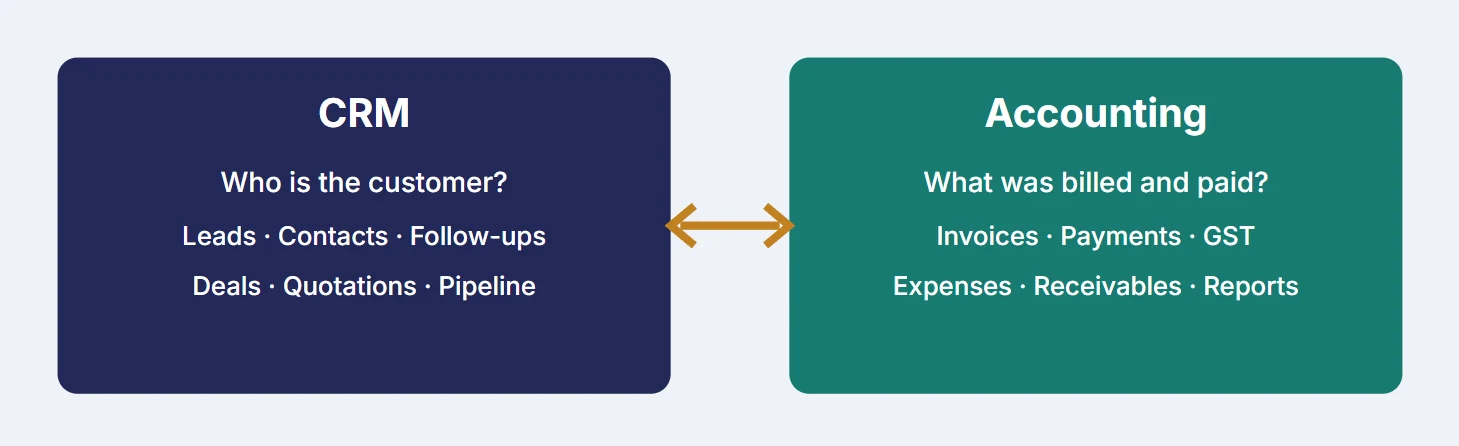
What a CRM and accounting software do
What is a CRM?
A CRM is a system that records every interaction with customers and prospects. It answers one question: who are my customers, and where are they in my sales journey? A typical CRM includes:
- Contact records: name, phone, email, company, address, and source of the lead.
- Lead and deal tracking: a pipeline showing each opportunity stage by stage.
- Follow-up tools: reminders, call notes, tasks, and meeting history.
- Quotations and proposals: price offers sent to prospects.
- Sales reports: conversion rates, lead sources, and team performance.
What is accounting software?
Accounting software answers a different question: how much money came in, how much went out, and who still owes me? It usually covers:
- Invoicing and billing: tax invoices, proforma invoices, credit notes, and recurring bills.
- Payment tracking: paid, partly paid, pending, and overdue amounts.
- Expenses and purchases: bills from vendors and day-to-day costs.
- Tax handling: GST rates, GSTIN fields, and tax summaries.
- Financial reports: profit and loss, receivables, and cash flow.
Problems caused by disconnected systems
When the CRM and accounting software don't share data, employees must transfer information manually between the two systems. This slows down daily tasks, increases the risk of errors, and delays invoicing and payment tracking. The most common problems are:
| Problem | What it looks like in daily work | Business impact |
|---|---|---|
| Double data entry | The same customer is typed into the CRM, then again into billing | Hours lost every week |
| Wrong details | Wrong GSTIN, spelling, address, or amount on an invoice | Corrections, credit notes, and customer irritation |
| Late invoicing | Invoices go out days after the deal closes | Delayed payment and weaker cash flow |
| No shared view | Sales cannot see payment status; accounts cannot see what was promised | Confusion and repeated questions |
| Missed follow-ups | Nobody owns overdue payment calls | Money stuck with customers |
| Mismatched reports | Sales figures and accounting figures disagree | Poor decisions, slow month-end |
Each issue looks small. Together, over a year, they cost a business time, money, and customer trust.
What CRM and accounting integration means
Integration means connecting the two systems so that information flows between them automatically, without manual copying. In practice:
- When a deal is won in the CRM, the customer details are already available for invoicing.
- An approved quotation converts into an invoice with the same items, prices, and tax.
- When a payment is recorded, the CRM shows the updated status.
- When a payment becomes overdue, the sales owner can see it and follow up.
Two ways to achieve integration
- All-in-one platform. A single product includes CRM and invoicing or accounting features.
- Connected separate tools. You keep a dedicated CRM and a dedicated accounting package and link them through a built-in integration, an API, or an automation tool such as Zapier.
Both approaches work. The right one depends on your team size, budget, and how complex your accounting is.
The sales-to-cash process, step by step
Sales-to-cash (also called lead-to-cash) is the full journey from first enquiry to money in the bank. Integration lets the whole journey run on shared data.
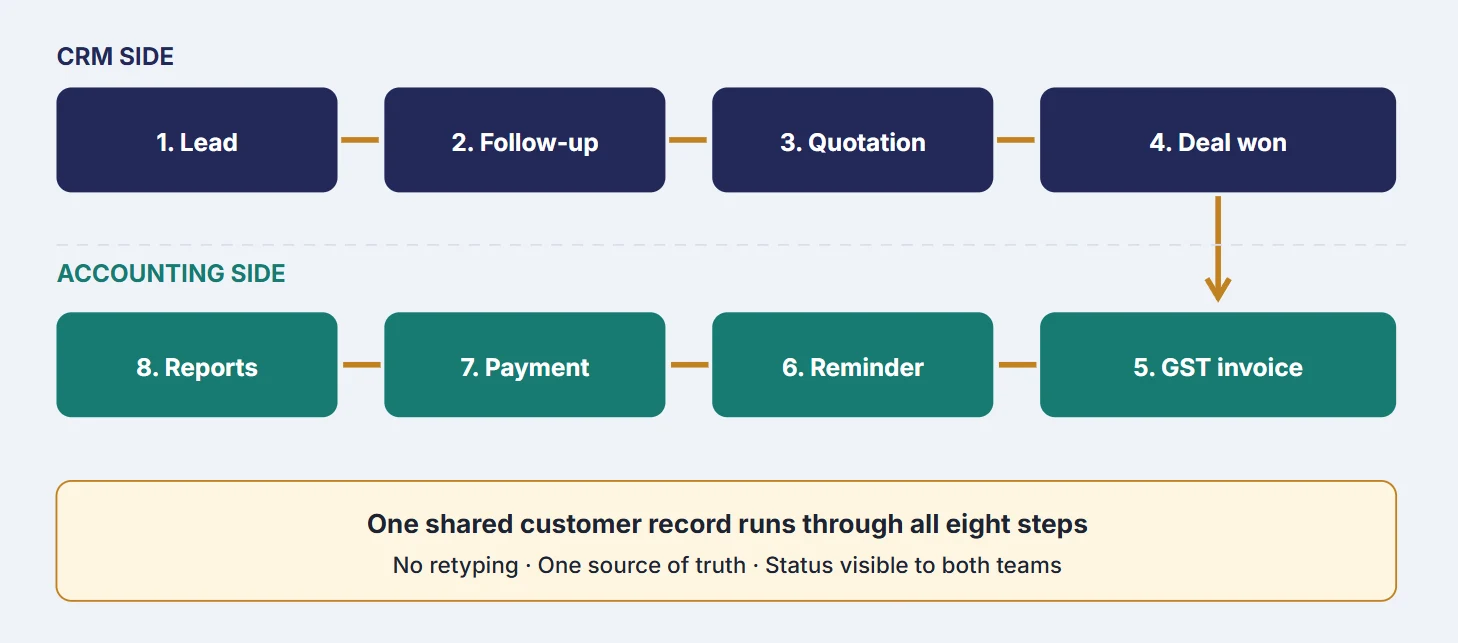
Step 1: Lead capture
A prospect enters through a website form, call, email, WhatsApp, social media, or a referral. The CRM records the contact and the lead source. Capturing the source matters, because later you can see which channels bring paying customers rather than just enquiries. If most of your enquiries arrive from a marketplace, see our guide to managing IndiaMART leads.
Step 2: Follow-up and qualification
Your team calls, meets, and messages the lead. Notes, next actions, and reminders are logged so that anyone on the team can pick up the conversation. The lead is moved through pipeline stages such as New, Contacted, Interested, and Negotiation.
Step 3: Quotation
A quotation lists services or products, quantity, price, discount, and tax. In an integrated setup, it pulls the customer name, address, and GSTIN from the same record, so nothing is typed twice. Our walkthrough on how to make a quotation has a format you can copy.
Step 4: Deal won
When the customer accepts, the deal is marked as won. This is the trigger for billing. In a disconnected setup, this is where messages start flying between teams. In an integrated setup, it is a single click.
Step 5: Invoice creation
The quotation converts to an invoice with correct items, tax, due date, and payment terms. The invoice can then be shared by link, email, or WhatsApp. Fast invoicing is one of the simplest ways to improve cash flow.
Step 6: Payment reminders
If the due date passes, a reminder goes to the customer. Because the sales owner can also see the overdue status, a friendly call from the person who knows the customer often resolves the delay quicker than a formal notice.
Step 7: Payment recording
Accounts records full or partial payments. The status updates across the system: paid, partly paid, or pending.
Step 8: Reporting
With all steps connected, reports show the full picture: leads generated, deals won, revenue billed, money collected, and amount pending. This is the basis for growth decisions.
CRM and GST billing in one place, free
IndiaCRM keeps leads, quotations and GST invoices on the same customer record, so a won deal becomes an invoice without retyping anything. See GST billing or create a free account.Which data should move between the systems
You do not need to sync everything. Start with the fields that remove the most manual work, then expand.
| Data | Direction | Why it matters |
|---|---|---|
| Customer name, company, phone, email | CRM to Accounting | Avoids retyping; keeps one customer record |
| Billing address and GSTIN | CRM to Accounting | Correct tax invoices; fewer corrections |
| Products or services, price, discount, tax | CRM to Accounting | Quotation becomes invoice with no changes |
| Deal status (won or lost) | CRM to Accounting | Triggers invoicing |
| Invoice number, amount, due date | Accounting to CRM | Sales sees what has been billed |
| Payment status (paid, partial, overdue) | Accounting to CRM | Enables follow-up and credit decisions |
| Customer lifetime revenue | Accounting to CRM | Identifies best customers and upsell chances |
Key benefits of integrating CRM with accounting
Saves time
Removing duplicate entry gives time back to every person involved. Sales spends more time selling, and accounts spends more time on review and analysis instead of typing.
Reduces errors
Manual copying causes typing mistakes in names, GST numbers, addresses, and amounts. Automatic data transfer removes most of them, and fewer errors mean fewer corrected invoices.
Speeds up invoicing and payment
An invoice that is ready the moment a deal closes can be sent immediately. Earlier invoices usually lead to earlier payments, which improves cash flow. Cash flow is the most common reason otherwise profitable small businesses struggle.
Creates one version of the truth
Sales and accounts look at the same customer record, so conversations start from the same facts.
Improves payment follow-up
Overdue invoices become visible to the sales team, who often have the best relationship with the customer. Collections become a shared effort. Our guide on tracking customer payments and dues covers the reminder schedule in more detail.
Gives better insight for growth
Connected data lets you answer questions that neither system can answer alone:
- Which lead source produces the most paying customers?
- Which customers regularly pay late?
- Which service or product earns the highest revenue?
- What is our average deal size and sales cycle length?
- How much revenue is still to be collected from won deals?
Supports compliance
For Indian businesses, consistent GSTIN, address, and tax details on every invoice reduce the risk of mismatches and notices. Always confirm tax treatment with your chartered accountant.
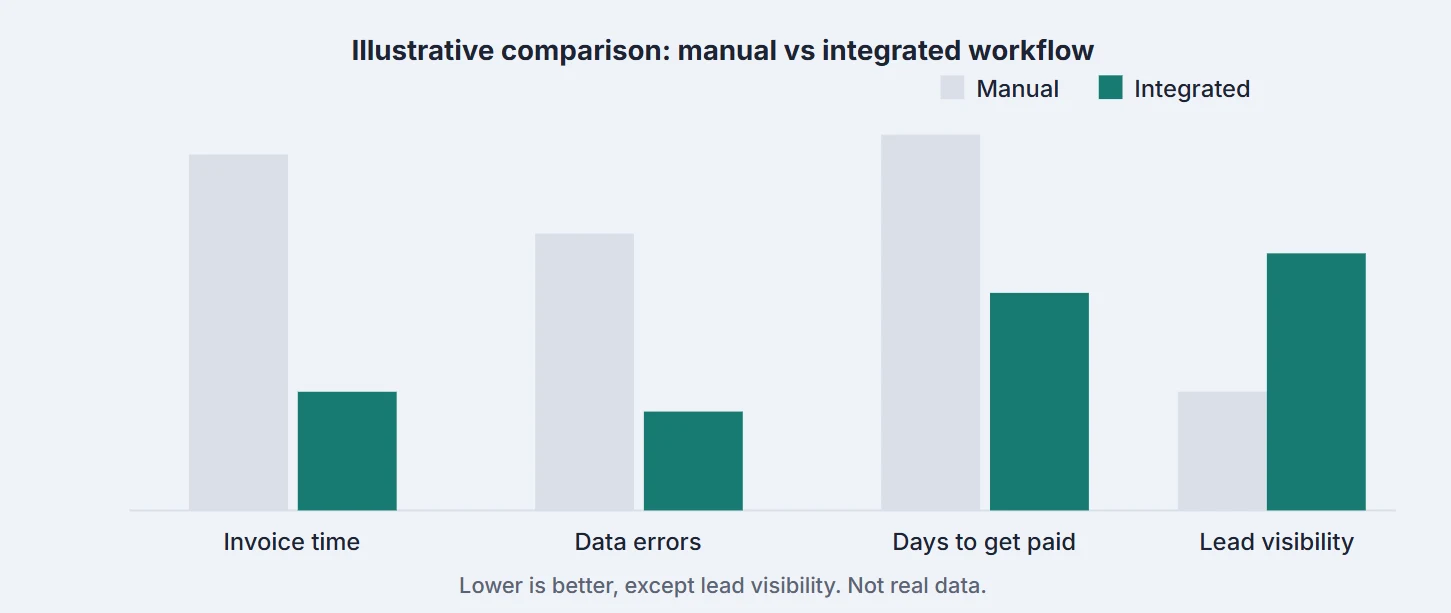
Before and after at a glance
| Task | Without integration | With integration |
|---|---|---|
| Creating an invoice | Retyping customer and item details | Convert the quotation in a few clicks |
| Checking if a customer paid | Ask the accounts team | Open the customer record |
| Payment reminders | Manual and often forgotten | Scheduled or semi-automatic |
| Monthly sales report | Combine several spreadsheets | One dashboard |
| Customer history | Spread across tools and chats | One timeline per customer |
One platform or two connected tools?
| All-in-one platform | Separate CRM plus accounting, connected | |
|---|---|---|
| Best for | Agencies, startups, small businesses | Larger firms with complex accounting |
| Setup | Quick and simple | Needs planning and testing |
| Cost | Often one subscription | Two or more subscriptions |
| Flexibility | Good | Very high |
| Technical help | Usually not needed | Often needed |
| Learning curve | Low | Medium |
Checklist when choosing a tool
- GST-ready invoices with GSTIN, HSN/SAC, and tax breakup
- Quotation-to-invoice conversion
- Payment tracking and reminders
- Mobile access for field teams
- Reports and dashboards
- User roles and permissions
- Data import and export
- Responsive customer support
If you are working through that list properly, our longer guide on choosing a CRM goes into what each item actually means in daily use.
Four software options for CRM and accounting integration
These options show the three common routes: one all-in-one platform, a CRM and accounting pair from the same vendor, and a CRM linked to a separate accounting package. The right pick depends on your country, team size, and budget, so test each with a real deal before you decide.
1. Refrens
Refrens brings your sales and finances onto one screen, making it easier to manage customer details without repeated data entry. It is built for service businesses, wholesalers, traders, and distributors.
Every enquiry, whether it arrives through your website form, IndiaMART, TradeIndia, or Facebook and Instagram, lands in a CRM that sits inside your accounting software, so the customer you follow up with today is already the customer you will bill tomorrow. Message them on WhatsApp or email, draft a quotation straight from the lead, and when they agree, one click converts it into a GST-ready invoice with no copying and no second system.
From there, a payment link makes paying easy, automatic reminders handle the awkward follow-ups, and live reports show which lead sources bring in real revenue and who still owes you money. With no exports, no re-entry, and no sync to maintain, it is a natural fit to run sales and billing from one login.
Refrens also offers AI-powered features to reduce manual work. Its Freya AI assistant helps with business tasks, while Eagle OCR extracts information from documents, helping simplify data entry and invoice processing. Refrens MCP lets you connect your Refrens account with an AI assistant and manage everyday sales and accounting tasks through prompts: adding a lead after a call, creating a quotation, turning it into an invoice when the client confirms, recording payments, or checking which customers have the highest outstanding amounts. You stay in control by choosing what the AI can access and do, such as allowing it to view invoices without giving it permission to create them.
For businesses with multiple people handling sales and accounts, approval workflows, role-based access, and audit trails can help manage who can access information and approve transactions. These features support better control over quotations, expenses, and financial processes.
2. IndiaCRM
IndiaCRM is a CRM built for Indian small and mid-sized businesses, with GST invoicing placed inside the same platform. Leads are captured through embeddable forms and channels such as IndiaMART and moved across a drag-and-drop pipeline with custom stages. When a deal is won, you create an invoice with CGST, SGST, or IGST and HSN or SAC codes calculated for you, then track payments and send reminders from the same screen. Reports show lead sources, team performance, and revenue, and extras such as a customer portal and AI tools are available. IndiaCRM is free to use, with unlimited users, and also includes inventory and HR and payroll tools alongside CRM and invoicing.
3. Zoho CRM plus Zoho Books
Zoho CRM manages your leads and deals, and Zoho Books handles invoices, payments, and tax. They are two separate products, but Zoho gives you a built-in link between them. To set it up, an admin opens Settings, then Integrations in Zoho Books, connects Zoho CRM, and chooses what to share, such as contacts, products, and, if switched on, quotes and invoices.
After that, you win a deal in the CRM, create the invoice in Books, and your sales team can see the invoice and payment status inside the CRM. It suits businesses already using Zoho, but note that Zoho CRM's own Quotes and Invoices modules do not sync directly with Books, and the setup needs some field mapping.
4. Salesforce CRM plus TallyPrime
Salesforce manages leads, customer relationships, and sales opportunities, while TallyPrime handles accounting, GST invoicing, and financial records. Since they are separate products, connecting them requires an integration solution or custom setup. TallyPrime supports data exchange with external applications, including CRM systems, through integration methods such as APIs, JSON, and XML.
Once configured, customer and sales data can move between the two systems, reducing manual data entry and helping sales and accounts teams track deals and invoices more efficiently. This option may suit growing Indian businesses that need a dedicated CRM alongside established accounting software.
| Option | Approach | Setup effort |
|---|---|---|
| Refrens | All-in-one platform | Low: nothing to connect |
| IndiaCRM | CRM with built-in GST invoicing | Low: nothing to connect |
| Zoho CRM plus Zoho Books | Same-vendor native integration | Medium: enable and map modules |
| Salesforce CRM plus TallyPrime | CRM linked to separate accounting | Medium to high: integration setup and data mapping |
A 7-step implementation plan

Step 1: Map your current process. Write down how a deal moves from lead to payment today. Mark every point where data is retyped, a handover happens, or a delay occurs.
Step 2: Set clear goals. Use measurable targets, such as "create an invoice in under five minutes" or "reduce overdue invoices by 30 percent".
Step 3: Clean your data. Remove duplicate contacts and correct phone numbers, emails, addresses, and GSTINs. Poor data going in means poor data coming out.
Step 4: Choose your tools. Decide between an all-in-one platform and connected tools based on your business needs.
Step 5: Define what data moves. Decide which system is the master for each field so the two never overwrite each other incorrectly.
Step 6: Run a pilot. Process 5 to 10 real deals end to end. Note the gaps, fix them, and only then roll out to everyone.
Step 7: Train the team. Show sales and accounts staff how the workflow helps them personally. Assign an owner to manage settings, users, and questions.
Common mistakes to avoid
- Skipping data cleanup. Importing messy records creates a messy system.
- Buying features you will not use. Start with core needs and add more later.
- Ignoring training. A tool nobody uses gives no return.
- No clear owner. Without one person responsible, settings drift, and problems linger.
- Weak access control. Financial data should be visible only to the right roles. Use strong passwords and, where available, two-factor authentication.
- No backup or export plan. Know how you can export your data if you ever switch tools.
- Expecting instant results. Allow a few weeks for the team to adjust.
How to measure success
| Metric | What it tells you | How to calculate |
|---|---|---|
| Time to create an invoice | Process speed | Average minutes from deal won to invoice sent |
| Days Sales Outstanding (DSO) | How fast customers pay | (Receivables divided by credit sales) times days in period |
| Invoice error rate | Data accuracy | Corrected invoices divided by total invoices |
| Lead-to-customer rate | Sales effectiveness | Customers won divided by total leads |
| Overdue amount | Collection health | Total value past due date |
Who should integrate?
- Freelancers and consultants who want professional quotations and invoices quickly.
- Agencies and service businesses with many clients and recurring billing.
- Traders and small manufacturers who handle quotes, orders, and GST invoices.
- Startups that want clean records from day one.
- Any business where sales and accounts do not see the same customer information.
Conclusion
A CRM tells you who your customers are. Accounting software tells you what they owe and what they have paid. Connected, they give you one clear record from first enquiry to final payment. The outcome is less manual work, fewer errors, faster payments, and better decisions, which are the foundations of steady growth.